
Since 2008 in New York Cityin NYC4.5 on Google · 400+ reviewson Google · 400+4,900+ repairs a yearrepairs/yr
Upper East Side, Manhattan
MacBook Water Damage Repair in NYC
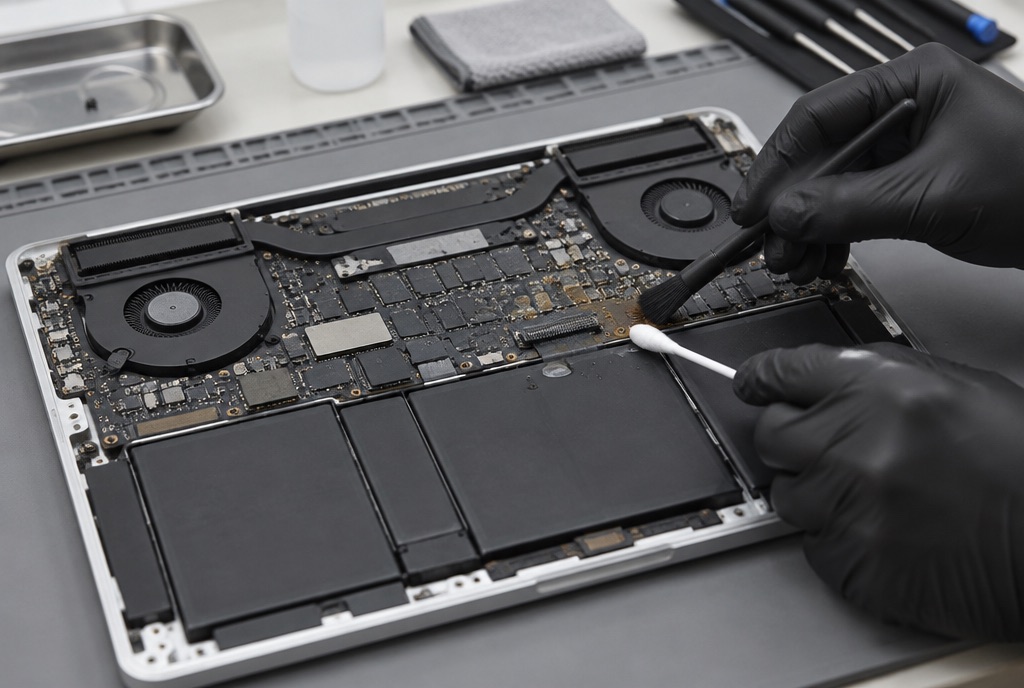
Coffee, water or soda on a MacBook Air or MacBook Pro? Unplug it, turn it off and do not turn it back on. Bring it in as soon as you can: we open it, clean the logic board, find what the liquid damaged, and give you the price before any work starts.
five iFIX stores, June–October 2026
this store, Jun–Oct 2026
Three ways to hand it in
Pick what fits your day. All three start with the same diagnostic and the same price-first rule.


What liquid does to a MacBook
Even if you wipe it off at once, a small amount of water, coffee or tea seeps into a MacBook, and that is when the real damage begins: corrosion on the logic board, electrical shorts, lost data. Our repair records for June–October 2026 across the five stores hold 37 liquid-damaged MacBooks. This is what they needed, most common first.
Liquid reaches the logic board first. The board is cleaned and the corroded or shorted parts are replaced at board level. See MacBook Pro logic board repair.
When the MacBook is opened soon after the spill, cleaning the board and its connectors is part of every repair, and sometimes the whole of it. That is why it matters to bring it in quickly.
Sticky, dead or repeating keys, a trackpad that stopped clicking: the keyboard takes the spill first. See MacBook keyboard repair.
No charging light, or a MacBook that runs only on the charger. The charging port or the circuit behind it is repaired.
A MacBook that went dark after the spill. Do not keep trying to start it: every attempt sends power through wet circuits. The diagnostic finds what failed.
Stains or lines on the display, or files you can no longer reach. Tell us at intake if the data matters more than the MacBook: see MacBook data recovery.
MacBook Air, MacBook Pro and other laptops
The repair is the same on every MacBook; what differs is the parts. In our records for June–October 2026, 20 of the 37 liquid-damaged MacBooks were MacBook Airs and 6 were MacBook Pros; the rest were logged without the model.
First aid
How to save your MacBook from water damage
What you do in the first minutes matters. The key is to bring your Mac in as soon as possible: the longer you wait, the more the logic board corrodes.
- Unplug it: first, disconnect the charger.
- Turn it off: turn the MacBook off and do not press any other keys or buttons.
- Let it drain: leave the screen open and turn the MacBook upside down so the liquid drains out, toward the side where it was spilled.
- Dab it dry: take the excess off with a clean dry towel.
- Do not turn it on: not to check whether it works, not to save a file.
- No rice: fine particles can enter the MacBook and create more problems.
From our repair records
Our numbers, not promises
Every liquid-damaged MacBook that comes in is logged in our repair system. June–October 2026, this store: 15 came in; every owner got a diagnostic and a price, 10 approved the repair and got the MacBook back working, and 3 decided not to go ahead after the quote.
Across the five stores in the same period: 37 in, 29 repaired, 5 declined after the quote. What the repairs were, June–October 2026: logic board work on 17, cleaning on 12, keyboard or trackpad on 9, charging port on 4.

Spilled on your MacBook? Keep it off and bring it in.
$99 diagnostic, credited to the repair. You hear the price before we touch anything.
How the repair works
Four steps, one decision point: yours.
About iFIX New York
Walk-in electronics repair in NYC
iFIX New York repairs electronics across the city. Our stores are in Midtown, the Upper East Side, Bay Ridge, Midwood and Bensonhurst. We offer a full range of services, including on-site business support and in-home repairs.
Why repair instead of replace? A repair usually costs less than a replacement, keeps your data where it is, and keeps repairable equipment out of landfills.
From Google
A MacBook owner on Google
A review of the Upper East Side store about a MacBook after a coffee spill, quoted as written.
My MacBook broke down, and on the recommendation of a knowledgeable friend, I took it to iFix. I was worried that the coffee I accidentally spilled on it had caused significant damage. However, my concerns were unfounded— they repaired it quickly, efficiently, and at a reasonable cost! It even seems to be running faster now! A huge thank you to the entire iFix team. The staff is incredibly friendly and professional! I highly recommend bringing your gadgets in for repair here!
Questions people ask
How much does MacBook water damage repair cost?
It depends on what the liquid reached, so the price comes after the $99 diagnostic, which is credited to the repair when you approve it. For scale: in June–October 2026 the middle half of the liquid-damage repairs we completed on MacBooks cost between $423 and $661 at this store and between $245 and $554 across the five stores, and 5 of 37 owners chose not to proceed after the quote.
How long does MacBook water damage repair take?
The median time from drop-off to pickup on liquid-damaged MacBooks at this store was 3 days in June–October 2026, with the diagnostic first and the repair after you approve the price. Logic board work, or a part that has to be ordered, takes longer; we tell you at the quote.
Can a water-damaged MacBook be fixed?
Often, yes: 29 of the 37 liquid-damaged MacBooks that came to our five stores in June–October 2026 were repaired and handed back. Bring it in as soon as you can; the longer the liquid sits, the more the logic board corrodes.
Should I put my MacBook in rice?
No. Fine particles can enter the MacBook and create more problems. Turn it off, let it drain and bring it in.
Will I lose my data?
Liquid damage can cost data. Tell us at intake if the files matter more than the MacBook, so the work is planned around the data: see MacBook data recovery.
Is water damage repair covered by a warranty?
No. Water-damaged devices are not covered by our repair warranty; most other repairs carry a 30-day limited warranty. See our Terms & Conditions for details.
I am outside New York. Can I mail my MacBook?
Yes. Pack it with padding on all sides and send it with tracking. We diagnose, text you the price, repair after you approve, and ship it back. See mail-in repair.
Five stores across New York
Walk in to the nearest iFIX
Our locations
Our locations
 M103 @ 3rd Ave. & E. 77th St.
 6 @ E. 77th St. & Lexington.
Q @ E 72nd St. & 2nd Av.
iFIX New York – Upper East Side
247 E 77th St,
New York, NY 10075
Mon–Fri: 10 am to 7 pm
Sat: 12 pm to 6 pm
Sun: Closed
6 @ 33 St
B, D, F, M @ 34 St-Herald Sq
N, Q, R, W @ 34 St-Herald Sq
1, 2, 3 @ 34 St-Penn Station
iFIX New York – Midtown
347 5th Ave, 15th floor, Suite 1502,
New York, NY 10016
Mon–Fri: 10 am to 6:45 pm
Sat: 12 pm to 6 pm
Sun: Closed
R @ 86 St
B37 @ 3 Av/83 St
B1 @ Bay Ridge 4 Ave
B @ Kings Hwy
Q @ Kings Hwy
B82, B7 @ Kings Hwy/E 18 St
N @ Bay Pkwy
B6 @ Bay Pkwy/Bay Ridge Av
iFIX New York – Bensonhurst
6908 Bay Parkway,
Brooklyn, NY 11204
Mon–Fri: 10 am to 7 pm
Sat–Sun: 11 am to 7 pm